
Novel planning guide
How to Plan Novel Chapters With an AI Chapter Planner (and Draft Them on iPhone)
Published August 2026
To plan novel chapters with an AI chapter planner, write a story setup the planner can read, then give every chapter a one-paragraph synopsis, a length, and the list of characters who appear in it. Generate each chapter in passes from that record instead of asking for the whole thing at once. The difference between this and pasting "outline my novel in 20 chapters" into a chatbot is that the plan lives next to the draft and gets revised as you write. Here is the method, using InkPal's Chapter Planner on iPhone as the working example.
Why outline generators produce outlines nobody drafts from
Search for a chapter outline generator and you'll find a dozen tools that take a premise and return twenty tidy chapter summaries in thirty seconds. The output is usually plausible and almost always abandoned by chapter four, for a structural reason: the outline was produced in one shot, from a premise, by a model that has not read a word of the draft. As soon as the actual writing diverges (and it will, in chapter two), the outline is describing a different book.
A chapter planner is a different kind of tool. The plan is a set of records the AI reads every time it generates, so it can be edited chapter by chapter as the draft teaches you what the story is. The outline generator is a document; the planner is a workspace.
Step 1: Write the story setup
Everything downstream reads from the story setup, so start there. Record the genre, the setting, the tone in a sentence, the central conflict, and the ending you are aiming for, even if it changes. Add the cast: one line per character with the trait that drives their decisions. In InkPal this lives in the project's setup and story facts, and every chapter generation sees it, which is what stops chapter nine from forgetting what chapter two established.
Step 2: Draft a one-paragraph synopsis per chapter
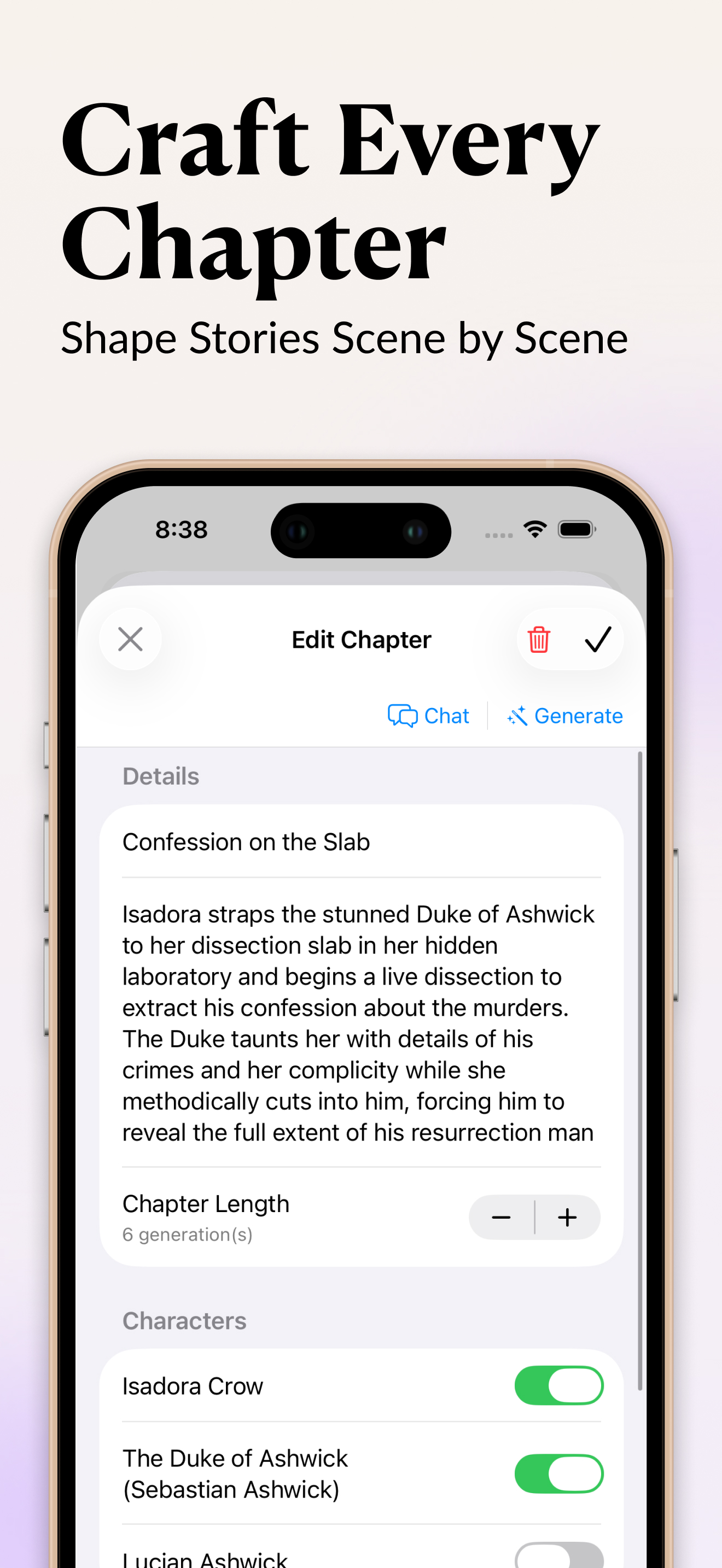
For each chapter, write four or five sentences: what happens, what changes for the protagonist, and the line or image you want to end on. The example in the screenshot does this in one paragraph: Isadora straps the Duke to her dissection slab, begins a live dissection to extract his confession, and he taunts her with her own complicity while she cuts. That is a chapter with a situation, a pressure, and a turn.
Twelve to eighteen chapters covers a standard novel; eight to twelve suits a novella or a long fanfiction arc. If you cannot write a synopsis for a chapter, the chapter is not ready, and that is useful to learn before drafting it. Leave it as a one-line placeholder and move on.
Step 3: Set the length and the cast
Two small settings do most of the work of keeping AI drafts on track. The first is chapter length, which InkPal measures in generations rather than words: six generations is a chapter with one main scene and an aftermath, three is a short bridge, twelve is two chapters pretending to be one. The second is the character toggles. Switch on only the characters who are in this chapter. Left to itself, a model will pull the whole cast into every scene because they are all in the setup; a toggle per chapter is a cleaner fix than a paragraph of prompt telling it who isn't there.
Plan chapter one tonight
InkPal holds the setup, the chapter plan, and the draft in one place on iPhone. Free to download, no sign-up.

Step 4: Generate scene by scene, and steer
With the record filled in, generate the chapter. Do it in passes: read the first generation, cut or rewrite what is off, redirect if the scene is heading somewhere flat, then continue. Chat with the chapter when you want to talk through a problem ("she wouldn't confess this fast, what else could she offer him?") and generate when you want prose. The same steering habits that work for a single scene work here; the planner just makes sure each pass knows which chapter it belongs to.
Where a chapter could go two ways, branch it and read the alternatives before deciding. It is cheaper than drafting the wrong version.
Step 5: Revise the plan after every chapter
Drafting changes the story. A minor character gets interesting, a reveal lands earlier than planned, a subplot dies. After each finished chapter, open the synopses that follow and bring them into line with what you actually wrote. This takes five minutes and is the whole reason to plan inside the writing tool rather than in a separate document: the plan and the draft stay in the same place and disagree less.
Then listen to the finished chapter before starting the next. Pacing problems that will shape the following chapter's synopsis are easier to hear than to see.
A planning template you can copy
| Field | What to write | Example |
|---|---|---|
| Title | A working name you can find in a list | Confession on the Slab |
| Synopsis | Situation, pressure, turn, closing image | Isadora straps the Duke to the slab and begins the dissection; he taunts her with her complicity; she gets the confession but not the one she wanted |
| Length | Generations, by what the chapter must do | 6 |
| Characters | Only those present | Isadora Crow, the Duke of Ashwick |
| Ends on | The last beat | The Duke names Lucian |
Frequently asked questions
Should I plan every chapter before I start writing?
Plan the first act in detail and the rest as one-line placeholders. Drafting the early chapters will change what the later ones need to do, and detailed synopses written before that point mostly get thrown away. Fill in each act's synopses as you approach it.
How long should a chapter be when an AI is drafting it?
Set the length by what the chapter has to accomplish, not by a word target. In InkPal the chapter length is a count of generations; four to six is typical for a chapter with one main scene and a turn at the end. If a chapter needs twelve, it is probably two chapters.
Related guides
Write a branching interactive story with AI using one chapter per path. Turn your story into an audiobook to review each chapter by ear. Best AI writing apps for iPhone, compared on planning and long-form control.