iPhone · Uncensored Roleplay

An AI roleplay app
that talks back.

InkPal is an uncensored AI roleplay app for iPhone. Create a character with personality, memory, and limits, then chat and roleplay with no filters — a private Character.AI alternative where the story stays between the two of you.

iOS · iPhone native Uncensored · adult roleplay Private · on-device Free · no sign-up
// What it is

What is an AI roleplay app?

An AI roleplay app lets you create a character — personality, voice, relationship, and limits — then chat and act out a story together. The character responds in the moment: it can resist, flirt, follow your lead, or surprise you, and the scene moves at your pace.

InkPal is an uncensored roleplay app for iPhone, and a private Character.AI alternative. It supports mature and adult roleplay without filters or refusals, remembers your character, and keeps every conversation on your device.
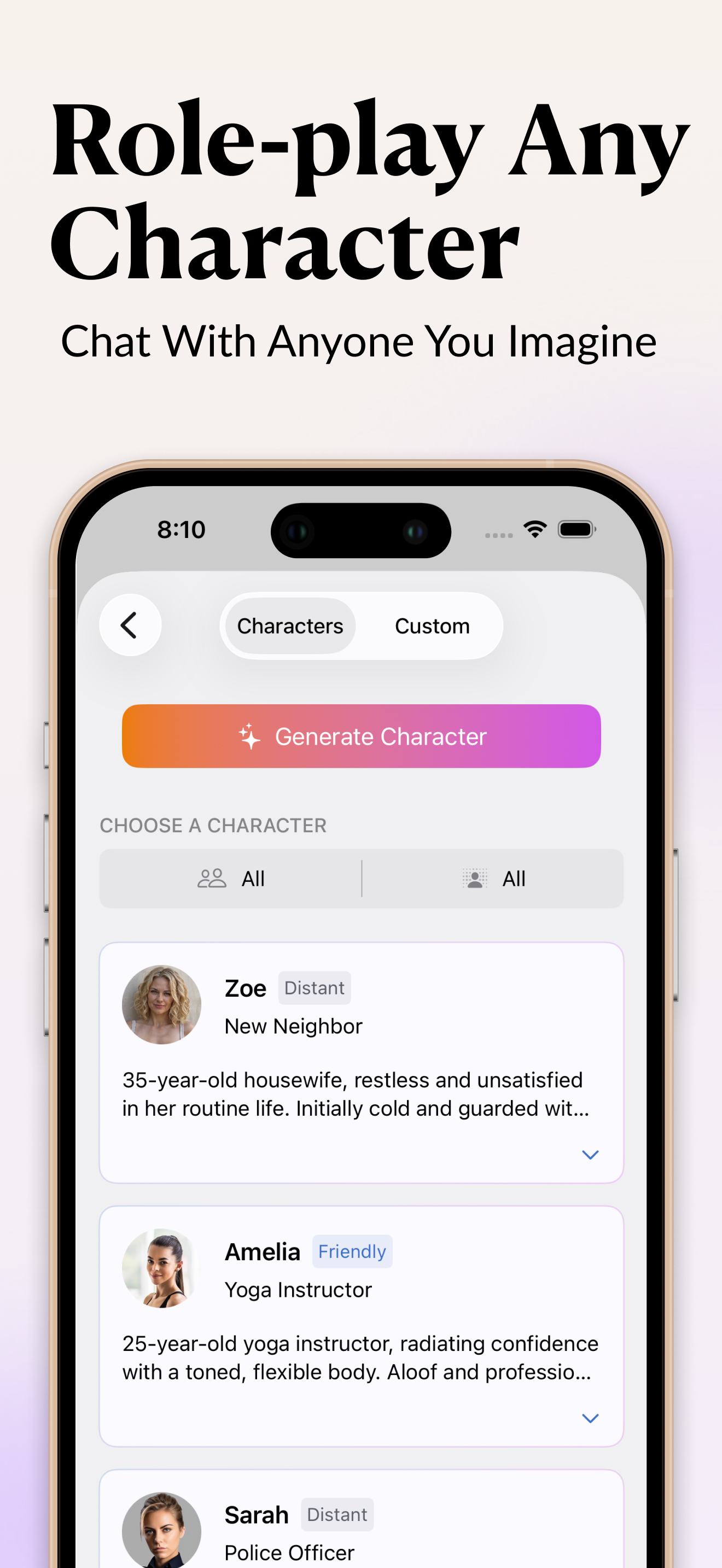
InkPal AI roleplay character chat on iPhone, with a defined character responding in a scene
Build a character with voice, memory, and limits — then roleplay the scene on iPhone.
// Why InkPal for roleplay

The story is just between you two.

Define a character

Set personality, voice, backstory, and boundaries. Your character stays consistent across the whole story.

Real memory

It remembers what happened, who said what, and where the relationship stands — so the roleplay builds.

No filters

Adult and mature roleplay is supported. It won't break character to lecture, refuse, or redirect you.

Character.AI alternative

The uncensored, private roleplay many people look for when other apps add limits — built for iPhone.

Stays private

Characters and chats live on your device. No cloud sync, no training on your content.

Roleplay → story

Turn a great roleplay session into a written scene or chapter without leaving the app.

// What roleplay in InkPal looks like

A character with a spine, not a chatbot.

"Roleplay" can mean a lot of things. In InkPal it means: you build a character with a defined personality, voice, backstory, relationships, and limits — and then the character stays in that frame across a long conversation. It doesn't forget who it is, it doesn't break character to add a warning, and it doesn't drift into a generic helpful-AI voice when the scene gets specific.

The minimum a character needs to feel real:

That's it. With those four anchors, InkPal can run a conversation that feels like a specific person, not a chat assistant pretending.

// How a roleplay session goes

The arc of an hour-long conversation.

A typical InkPal roleplay session — say you've built a character named Maya, a sharp, guarded ER nurse who's been your friend for years and is staying at your place tonight after a bad shift:

  1. Open with a small move. "I leave a mug on the counter; she picks it up without looking and asks how my day was." Don't lead with the dramatic beat — let the character settle in.
  2. Hold your line; let her hold hers. Don't push the conversation toward where you want it. Let her resist, deflect, redirect. The friction is the scene.
  3. Watch the shift. A good roleplay session has a moment where something changes — a wall comes down, a line gets crossed, a sentence lands harder than expected. InkPal can write toward that without you forcing it.
  4. Edit memory if needed. If the character forgets a detail or drifts, you can pin facts into her memory mid-session — "she has never told you about her brother" — and continue.
  5. Save it back as a scene. When the conversation lands somewhere worth keeping, drop the transcript into a chapter and edit it like prose.

This is a different rhythm from a chatbot — closer to writing improvised dialogue with a co-author who's also reading the character.

// What you give up when an app filters its characters

Filtered roleplay = sanded-down characters.

Most general roleplay apps apply content moderation by design. That's reasonable for all-ages chat, but it changes the experience in ways that matter for adult writers:

InkPal lets the character stay as you wrote them. If she's the kind of person who flirts in dangerous directions, she will. If he's the kind of friend who would say the wrong thing at 2 a.m., he does. The story moves at the pace of the characters, not the pace of the filter.

// Roleplay → manuscript

Turning a conversation into a scene that reads.

A roleplay transcript is rough draft, not finished prose. The transition InkPal makes easy:

  1. Run the conversation in roleplay mode.
  2. Save the transcript back into your manuscript as a draft scene.
  3. Switch to writing mode and ask InkPal to rewrite the transcript as prose — close third POV, his perspective, present tense, keeping all the dialogue intact.
  4. Edit by hand. Cut the small talk, tighten the dialogue tags, keep the lines that surprised you.

That loop — roleplay it, transcribe it, rewrite it — is how a lot of dialogue-driven scenes get written faster than typing them from scratch, without losing the surprise that made the roleplay worth doing in the first place.

// FAQ

AI roleplay — questions

What is an AI roleplay app?

An AI roleplay app lets you create a character with a personality, voice, and memory, then chat and act out a story together. InkPal is an uncensored AI roleplay app for iPhone where the character responds, resists, flirts, or follows your lead.

Is InkPal a Character.AI alternative?

Yes. InkPal works as a private, uncensored Character.AI alternative for iPhone. It supports mature and adult roleplay without filters, and your chats stay on your device.

Is there an uncensored AI roleplay app for iPhone?

InkPal is an uncensored AI roleplay app for iPhone, free on the Apple App Store. It supports adult (17+/18+) roleplay and does not refuse or redirect the story.

Are my roleplay chats private?

Yes. Conversations and characters are stored on your device, and InkPal does not train on your content.

// Start tonight

Meet a character who's talking to you.

Free to download. No sign-up. Build a character and start the roleplay.

Download on the App Store · Free